The .qrb File Format Explained
A .qrb file is a ZIP archive that holds an ordered set of QR payloads. The founder of NxtTools on what's inside the format and why it exists.
Jangul Aslam12 min read
I designed this format, so read the rest with that in mind
I built the .qrb format for NxtTools, the all-in-one utility app my company makes. I am Jangul Aslam, and NxtTools is built by Const Agility, LLC out of Texas, USA. Today, NxtTools is the only software that produces and opens .qrb files, so the post you are reading is biased. I am explaining a format I authored, and I have an obvious interest in you using it.
What I will not do is dress this up as a neutral survey of file formats. This is one engineer telling you why a QR collection needed a file format of its own, what is physically inside a .qrb, and where the format deliberately stops short of being a universal standard. If you came here to know whether a .qrb will still open in three years, that answer is yes, and I will show you the part of the spec that makes it a real promise rather than a marketing line.
TL;DR
- A
.qrbfile is a ZIP archive. Rename it to.zip, open it, and you can read every byte. There is no proprietary binary and no DRM. - Inside are three things:
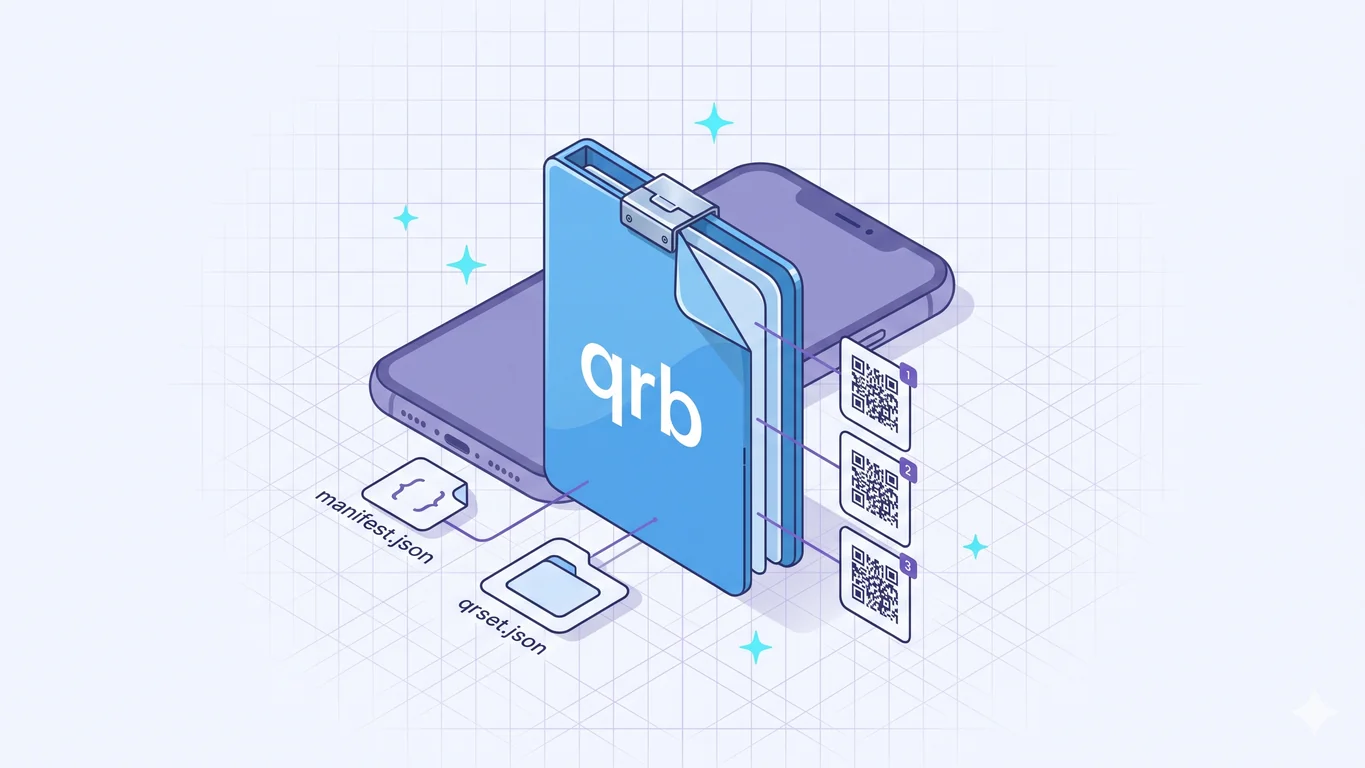
manifest.json(what the bundle is),qrset.json(the ordered list of entries), and anassets/folder for any per-entry images. - Each entry stores the raw QR payload in a
valuefield, plus optional labels and metadata. Because the payload is preserved, NxtTools re-renders a scannable QR from every entry when you open the file. - The schema is versioned
qrbundle/1.0with a written backward-compatibility guarantee: existing fields are never removed, and unknown fields must be ignored by readers. - The format is open and documented at github.com/ConstAgility/qrbundle. It is a NxtTools-native format today, not a universal standard like PDF. That honesty matters, and I cover it below.
Why a collection of QR codes needs a file at all
The obvious objection is: why not just send a list of links? For the most common case (a handful of website URLs), you could. But "a QR Bundle is a list of links" is the thing the format had to outgrow, for two reasons.
The first is structure. A pile of links has no shape. The whole point of a bundle is that the person on the other end opens one file and sees your twenty-five furniture options as a single named set, not a wall of loose text. Plain text loses that the moment it leaves your phone. The pillar post, What Is a QR Bundle, walks through the day that made this concrete for me.
The second reason is the one people miss: not every QR code is a link. A QR code can encode a Wi-Fi handshake, a phone number, a calendar event, or a shipping return label whose payload is not a URL at all. If a bundle only stored URLs, it could not hold those. So the format stores each entry's raw scannable payload, link or not, which is the point QR Bundle use cases covers with the Amazon-returns example. A list of links physically cannot do that job.
There is prior art for "encode structured data in a portable form" — vCard and MeCard have done it for contact cards for decades, and they are excellent at exactly that. But a vCard describes one contact. There is no established, open, file-based way to hand someone an ordered, labeled set of arbitrary QR payloads. That gap is what .qrb fills.
What is actually inside a .qrb
Open one and you will find a small, deliberately boring structure:
| Member | What it is |
|---|---|
manifest.json | Bundle-level metadata: schema version, a unique bundle id, title, created/updated timestamps, the creating app |
qrset.json | A top-level JSON array: the ordered list of entries |
assets/ | Any per-entry images, referenced by path from the entries |
mimetype | Optional marker file containing application/vnd.qrbundle |
A bundle NxtTools writes is tagged honestly. The manifest.json carries "schema": "qrbundle/1.0", a createdBy of NxtTools, and a source-app id of com.constagility.nxttools, so any reader (including a future one I have not written) can tell where the file came from.
The entries live in qrset.json. Each one carries a value field, and value is the raw QR payload: the exact bytes you would get if you scanned the code with a camera. For a website QR that is the URL. For a shipping return label it is whatever the carrier encoded. Alongside value, an entry can carry optional fields: a type marker, a human-readable title, a scan timestamp, plus notes, a price, coordinates, or image references. NxtTools today writes the links subset of that: the raw payload of each code, gathered under one bundle name. The richer per-entry fields exist in the format and are exercised by a separate product, which I will get to.
Preserving the raw payload is what makes a bundle more than a screenshot album. When NxtTools opens a .qrb, it reads each value and re-renders a fresh, scannable QR from it. A return label you bundled three weeks ago still scans at the carrier counter, because the file kept the data, not a picture of the code. That single property is why the format stores payloads instead of rendered images.
Is this the same as Qt's .qrb or the Nxt-blockchain .qrb?
No. The disambiguation is worth a paragraph because .qrb is, frankly, a shared extension and I would rather say so up front. If you searched for .qrb before landing here, you probably saw a handful of unrelated projects:
- Qt Resource Bundle. Qt's
rcctool compiles application assets into a binary.qrbfor desktop and embedded Qt apps. Generated by build tooling, not by humans. Internally a Qt-specific compiled blob with no manifest and no JSON. - NetBrain Runbook. A network-automation runbook format used by NetBrain's NOC tooling. Nothing to do with QR codes and nothing to do with us.
- Jelurida's "Nxt Tools" and the Nxt blockchain. An older cryptocurrency project named "Nxt" that pre-dates this app by about a decade. The
NxtToolsGitHub repos in that namespace are for Nxt-blockchain wallets and node tooling. Different "Nxt," different "tools," different product. Not us. - LEGO Mindstorms NXT robotics. The
qreal/nxt-toolsandtrikset/nxt-toolsrepos are educational robotics tools for the old NXT brick. Also not us.
If you have a .qrb in front of you and are not sure which kind it is, the test is mechanical. Unzip ours and you get a manifest.json carrying "schema": "qrbundle/1.0", a qrset.json with QR entries, and an assets/ folder. Unzip a Qt one and you get a compiled binary section with no manifest and no JSON. The MIME type application/vnd.qrbundle is the formal arbiter — Qt does not register a MIME at all and is identified by header magic. File size is a fast tell too: an NxtTools bundle of five QR codes is usually under 50 KB; a Qt resource bundle for a real desktop app is typically megabytes.
The part that makes it a real promise: it will not rot
A file format is only trustworthy if a file you make today opens years from now. The .qrb spec at github.com/ConstAgility/qrbundle writes that down as rules, not hopes.
The schema string qrbundle/1.0 is versioned on purpose. The spec commits to three things in plain language. Existing fields are never removed. New fields may be added. And unknown fields must be ignored by readers, so an older app opening a newer bundle skips the fields it does not understand instead of choking on them. A breaking change is not allowed to happen in place; it requires a new version string, qrbundle/2.0, which old readers can recognize and handle deliberately.
The .qrb extension, the application/vnd.qrbundle MIME type, and the permanent filenames manifest.json and qrset.json are also pinned as stable across versions. Pair that with the format being a plain ZIP of plain JSON, and the worst case is reassuring: even if every app that reads .qrb disappeared, you could unzip the file and read your data in any text editor. That is the "your bundles will not rot" guarantee, and it is the reason I published the spec publicly rather than keeping it in the app.
NxtTools writes the simple half — on purpose
I said the format carries more than NxtTools writes. Here is the honest accounting. NxtTools writes links: the raw payload of each code, saved under one bundle name. The richer item-card side of the format covers entries that carry a per-entry label, a product photo, a price, a store location, or your own notes — and the reordering and item cards that make those readable. That side belongs to the upcoming QRly product, currently in stealth with an In the works… note. Same .qrb format underneath; more of its fields put to work on top.
That split is a strategy, not an accident. A format only matters if people adopt it, and free plus simple is how adoption happens. NxtTools writes the simplest useful form of .qrb for free, with no account, so the format gets out into the world. QRly will exercise the rest.
When NxtTools is not the right fit
The format earns its place for a specific job. These are the cases where it does not, said plainly.
- You only have one link. A file format is overhead with no payoff for a single URL. A plain QR code or just sending the link is simpler. If you want a single printable QR image, a free web generator like QRCode Monkey makes one with no install and no account. Reach for a bundle only when one code is not enough — the line between the two is the whole subject of QR Bundle vs Single QR Code.
- Your recipient will not install an app. A
.qrbis a NxtTools-native format today. It is not a universal standard the way PDF is — there is no built-in OS support, and the recipient needs NxtTools to open the file. For a one-off handoff to a stranger, a single QR code or a public link is lower friction. I would rather you know that up front than discover it when you send a bundle to someone who cannot open it. - You are sharing a single contact card. vCard is the right tool, full stop. It is a decades-old open standard that every phone, email client, and address book already reads. Wrapping one contact in a
.qrbbuys you nothing and costs your recipient an install.
Where the bundle is the wrong shape, a simpler tool wins, and I would rather point you to it. But the app you would install to read a .qrb is not a one-trick app. NxtTools also bundles a document scanner, PDF tools, image tools, and a signature pad in the same free install — so the next time you need to scan a contract or shrink a PDF on your phone, you are not hunting for a different download. The format is narrow by design; the app around it is not.
FAQ
What is a QR bundle and how does it work?
A QR bundle is a file with the extension .qrb that holds an ordered list of QR codes. Under the hood it is a ZIP archive containing a manifest.json describing the bundle, a qrset.json listing every entry, and an assets/ folder for any images. You build one on your phone, then share the file like a PDF. The recipient opens it and sees every entry in one view, no master QR code involved.
How do I group QR codes together?
Scan or paste each code into a single QR Bundle and name it. NxtTools saves the whole set as one .qrb file you can share like any other document. Because the format stores each code's raw payload, the bundle re-renders every entry as a scannable QR when it opens — so a grouped return label stays a working return label, not just a screenshot.
What are shareable QR codes?
Shareable QR codes are codes you collect and send as a set rather than scan one at a time. A QR Bundle is the file that makes this work: a .qrb archive holding the raw payload of each code. You send it over AirDrop, iMessage, WhatsApp, or email like any file. There is no public page and no hosting service in between — the codes live in the file you handed over.
What is the best QR bundle app?
NxtTools is the QR bundle app today, because it is the only app that writes and reads the .qrb format. It builds bundles on your phone for free with no account, and the format it writes is documented in a public spec at github.com/ConstAgility/qrbundle. A richer item-card experience on the same format is coming separately at QRly. If you only need a single static QR image, a plain web generator is simpler than any bundle app.
Get NxtTools
The .qrb format only matters if you can build one in a few taps, so QR Bundles ships free in NxtTools with no account required. The same install also gives you a document scanner, PDF tools, image tools, and a signature pad.
- iPhone & iPad — App Store
- Mac (Apple Silicon, M1 and up) — Mac App Store (same iPad app, installs natively as a desktop application; Intel Macs are not supported via this path)
- Android — Google Play
If the richer item-card vision built on the same format is what you actually want, qrly.space is where that is heading.